

Better systems.
Less friction.
More room to run your business.
I turn real operational problems into practical tools for teams. I have opened and run shops, trained crews and done the back-office work myself, so the tools start from how the work actually happens rather than how software thinks it should.
25
training modules in Rad Hub, with a 72-question certification and hands-on verification of 16 skills.
14
people on the Screamers opening team who trained, clocked in and ran shifts from Scream Hub on day one.
1 feed
in DeskPanther where counts become vendor-grouped draft orders and submissions wait for an attributed review.
Rad Hub
Rad Coffee, multi-location
THE PROBLEM
New baristas at several stores were learning the bar from whoever happened to be on shift, with no consistent way to confirm they were ready before serving customers.
MY ROLE
Designed and built the training program and the app that delivers it, with AI-assisted development. Wrote the 25 modules and the certification, and defined who can see what by role.
25 training modulesCompany basics, safety, operations, and a 7-part drink course, completed on the store computer before a first shift.
Certification assessmentA 72-question knowledge check with an 80% passing score, plus hands-on verification of 16 skills signed off by a trainer.
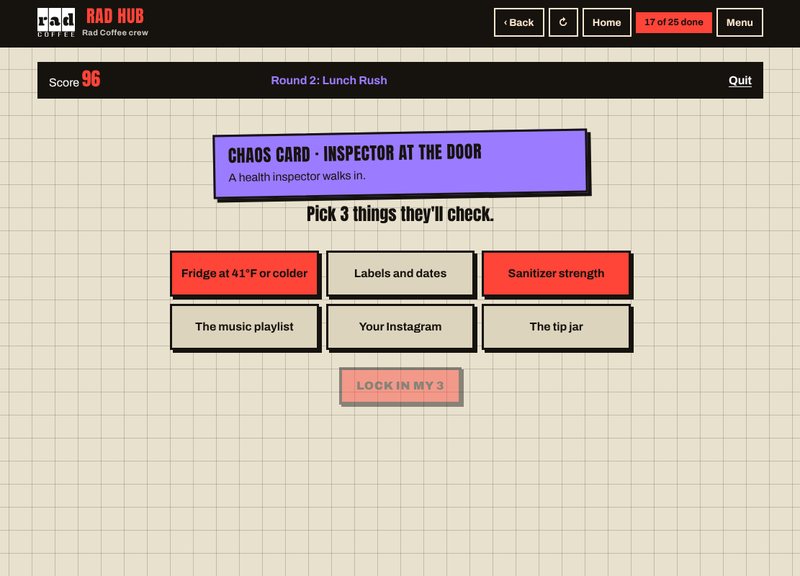
Rad RushTimed, interactive drill that simulates a rush with order tickets and situational cards, in the app and as a printable kit.
RESULT
A new hire at any location follows the same path from sign-in to certification, and a manager can see at a glance who is ready and who is not.
The problem and previous workflow
- Training was verbal and varied by store and by trainer.
- There was no record of what a new hire had covered or whether they had been checked on the bar.
- Recipe and procedure questions went to whoever was on shift, interrupting service.
What I designed and built
- A private web app baristas open on the store computer: sign in by phone number with a store code so each hire joins the right location.
- 25 modules with slides and quizzes: company basics, workplace safety, the operations binder, and a 7-part drink course covering the espresso machine, grinder and blender, pulling and dialing in, milk steaming and food safety, blended drinks, the full recipe book including seasonal drinks, and cleaning with opening, mid-shift and closing checklists.
- A 72-question certification at 80% to pass, and a 16-skill hands-on checklist a trainer signs off in person.
- Rad Rush: 32 order tickets across three rounds of rising difficulty, 10 situational cards for real problems such as a spill or an inspector arriving, scoring with ranks, and a 15-page printable version with cut-out cards and trainer answer keys.
- The drink guide delivered as a shareable document and a 31-page PDF for stores that want paper.
How the workflow operates
- Owner adds the new hire and shares the store code.
- Hire signs in, reads the welcome and roadmap, and works through the modules in order; progress shows on a training card.
- Hire takes the certification; the app records the score.
- A trainer verifies the 16 skills on the bar and signs off.
- The owner dashboard shows each person's modules, score and sign-off status by store.
Automation and human oversight
- Scoring, progress tracking and certification status are rule-based and automatic.
- Hands-on sign-off, pass or retake decisions, and what a person is scheduled to do remain with trainers and managers.
- There are no runtime AI features in the app. AI was used to accelerate development; the requirements, content, workflow and review boundaries are mine.
Integrations and access controls
- Roles for baristas, shift leads and team leads; an owner dashboard for adding crew, resetting passwords and tracking onboarding.
- Training content is encrypted inside the app and unlocks only for signed-in crew.
- Shared-computer safety: the session ends when the tab closes and signs out after 15 minutes of inactivity.
- Built on Supabase for authentication and data, with a tested build pipeline.
Results and implementation details
- Every location runs the same program with the same pass mark.
- Managers see readiness per person without asking around.
- Awaiting verification before publishing: schedule imports, position-based task lists, timecard review and device approval. Those exist in Scream Hub and are listed there; they are not claimed for Rad Hub on this page.
HOW THIS COULD HELP YOUR TEAM
If your onboarding depends on whoever is working that day, a structured program with a clear finish line gives managers a consistent standard and gives new hires a path they can see.
Scream Hub
Screamers Soda, opening team of 14
THE PROBLEM
A new shop opening with 14 people needed training, a time clock, a shift board, and a way for the owner to see labor and performance without stitching together four apps.
MY ROLE
Defined the workflows from running the shop, then designed and built the app with AI-assisted development. I own the requirements, the user experience, and the rules for what the software decides versus what a person decides.
Training and recipes17 modules with quizzes and certification, step-by-step recipe cards by size, a seasonal menu, and a drink-building drill.
Timekeeping with acknowledgmentiPad time clock, break and lunch tracking, and employees reviewing and approving their own hours each pay period.
Labor and performance reportingSquare sales data alongside labor hours for a live labor percentage, with planning scenarios the shift leads can explore.
RESULT
The opening team trained, clocked in, ran shifts and closed out from one app on the store iPad and their phones from day one, with the owner reviewing hours and labor from a single view.
The problem and previous workflow
- Opening a shop means hiring and training everyone at once, with no existing habits to lean on.
- Off-the-shelf tools covered pieces (scheduling, payroll, POS) but none connected training, the shift itself, and the numbers.
- The owner needed to see labor and sales together, not after the pay period closed.
What I designed and built
- Training: 17 interactive modules with slides and quizzes, a digital training card, certification on completion, an onboarding form for contact details, availability and food handler card, and invite-only accounts.
- Drink guide: recipe cards for every drink by size, a seasonal menu that switches by month, float, batch and party-order planners, and recipe search by code or name.
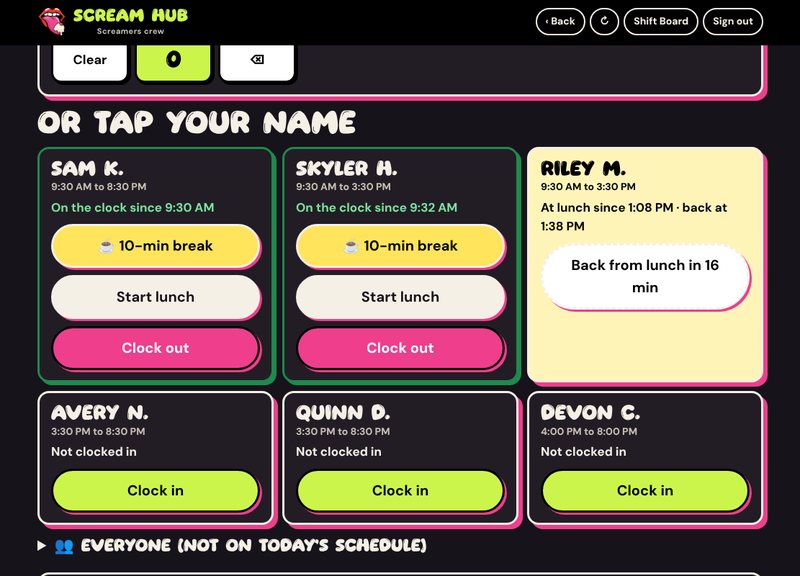
- Shift board on the store iPad: a daily lineup with color-coded stations, a break and lunch planner built from each shift, auto-assigned opening, mid-day and closing checklists, sold-out tracking, a batch log, and daily notes.
- Time clock: large-button clock-in on the iPad, clock-in by phone number for anyone not on the schedule, a lunch lock that prevents clocking back in before 30 minutes, paid break tracking, and employee review and approval of their own hours.
- Reporting: live labor percentage, sales per labor hour and overtime alerts from Square; a Labor Lab with what-if sliders for staffing; an owner-only money view with planning estimates.
- Team tools: shift notes between leads, incident and hazard reports, an operations binder, and messages to the owner with photos.
How the workflow operates
- A new hire is invited, completes onboarding and the 17 modules, and is certified.
- On shift, the iPad shows the lineup, stations and tasks for the day; the crew clocks in and out there.
- Missed, late or short lunches raise a flag; the employee answers it before approving hours.
- At the end of the pay period, employees review and approve their hours and can request corrections.
- The owner reviews, edits where needed, and exports a payroll summary for the bookkeeper.
Automation and human oversight
- Rule-based: break and lunch timing, task assignment by station, overtime alerts, labor math from Square, payroll export preparation.
- Human: whether a flagged lunch is excused, corrections to a shift, pay rates, and submitting payroll. Payroll is reviewed and submitted by a person; the app prepares it.
- Financial dashboards show planning estimates built from sales, labor and entered cost assumptions. They support decisions; they are not accounting.
- Break and lunch flags are prompts for review. The software does not determine legal compliance and does not replace advice from a professional.
- No runtime AI. AI accelerated development; workflows and review boundaries were defined by me from running the shop.
Integrations and access controls
- Square for sales data and item-level cost of goods.
- Schedule import from Sling; payroll export prepared for a Gusto workflow.
- Roles for owner, shift leads and crew, plus one approved store iPad. Pay and sales details are visible to the owner only. Recipes can be restricted to the store device.
- Supabase for data and authentication, hosted on Netlify. Works on any phone or tablet without an app store and updates itself.
Results and implementation details
- Launched for the grand opening in October 2026 and used every shift since.
- Training, time, tasks and reporting live in one place for a 14-person team.
- Payroll preparation moved from assembling hours by hand to an owner review and a one-tap export.
HOW THIS COULD HELP YOUR TEAM
If your team runs on a group chat, a paper schedule and a separate payroll app, one place for training, time, tasks and reporting removes the daily reconciliation and gives the owner a current picture.
DeskPanther
Live subscription operations platform for coffee shops
Employee counts inventory
Shortfalls calculated against location targets
Draft orders grouped by vendor
Manager reviews and submits
THE PROBLEM
Back-of-house work in a coffee shop lives in disconnected forms and messages: inventory counts, purchasing, time corrections, incident reports, onboarding. Information is repeated, follow-ups are missed, and nobody has one view.
MY ROLE
Product owner. A contract developer built the original codebase; I took over development, and I now direct and implement changes with AI assistance. I define the workflows from operating the shops and verify behavior against real records.
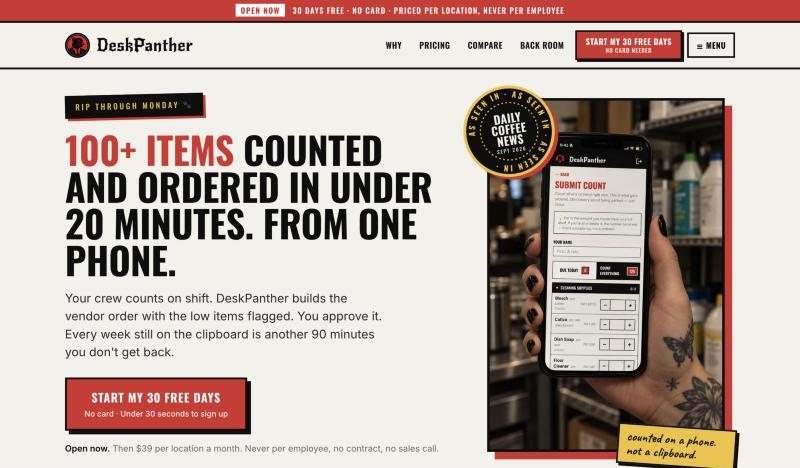
Inventory to draft ordersEmployee counts are compared with location-specific targets; shortfalls become draft orders grouped by vendor for a manager to review.
Attributed reviewTime-clock corrections, break attestations and incident reports are submitted by employees and resolved by authorized reviewers, with the decision recorded.
Onboarding and accessRole- and location-specific invitations with expiring codes, duplicate prevention, and limits on who can grant access.
RESULT
Connected operations, clearer accountability. Counts, purchasing preparation, employee submissions, onboarding and management visibility in one platform, with deliberate human checkpoints at every step that commits money or affects a person. In use every shift by 38 employees across three Rad Coffee stores since July 2026, which are my own stores; that is firsthand operating experience, not independent data.
Inventory to purchasing preparation
- Each location has target levels per item. When an employee submits a count, the platform calculates the shortfall against those targets.
- Shortfalls are turned into draft orders grouped by vendor, so a manager sees one list per supplier instead of one long list.
- Historical values are preserved on the records, so a count or an order can be read later as it was at the time.
- A manager must review and submit an order. The platform does not place orders unattended and does not communicate with vendors on its own.
Employee submissions and review
- Employees can submit time-clock correction requests, break attestations and incident reports without asking a manager first.
- Authorized reviewers handle each submission. A correction decision records who reviewed it, when, what action was taken and why.
- The platform organizes and records these decisions. It does not make payroll or legal determinations.
Onboarding and access
- Invitations are specific to a role and a location and carry an expiring code.
- Duplicate accounts are prevented, and a failed account creation rolls back so nothing half-exists.
- Only designated roles can grant access.
- This is account provisioning: the right person gets the right access at the right store. It is not a complete HR onboarding program.
- Reminder emails for open invitations exist; whether they send on a schedule in production depends on external scheduling configuration, which is being confirmed.
Operational visibility and notifications
- One combined feed surfaces low stock, maintenance items, cash drops, employee submissions and overdue counts.
- The feed brings records forward for review. It does not resolve them on its own.
- Email routing is location-specific, so a manager hears about their store and is not copied on everyone else's.
- The Daily Brief is built from record selection and sorting, not AI-generated analysis.
Product ownership and iteration
- I identify the problem from operating the shops, define the change, investigate failures, implement with AI assistance, and verify the result against actual records and workflows.
- A typical cycle: a customer-facing symptom at the counter is traced back through the records to the process step that produced it, the step is changed, and the fix is checked against the next real occurrences rather than assumed from the code.
- Ongoing development and product direction are mine.
- Sold as a subscription priced per location, not per employee, with a 30-day trial. Public feature set as listed on deskpanther.com: counts and ordering, out-of-stock alerts, repairs, shift notebook, cash drops, announcements, time and break records, and an optional Daily Brief for multi-location owners.
Technology and controls
- MongoDB stores operational records. Firebase handles authentication. SendGrid delivers location-routed email. Google Cloud and Vercel host the application. Stripe handles subscription billing.
- Controls include role- and location-scoped permissions, transactional writes so related records change together or not at all, and attributed review records on decisions.
- Automated writeback of Stripe subscription status into the platform was deployed but not yet activated at the time of the last review, so live automated billing reconciliation is not claimed here.
- No runtime AI features are part of the reviewed implementation.
HOW THIS COULD HELP YOUR TEAM
If your team relies on disconnected forms, repeated follow-ups, or information spread across tools, I can help define a clearer workflow and build or connect the systems that support it.